Pin feedback.
Track bugs.
Ship faster.
WebPinch lets you and your clients click anywhere on a website to leave feedback — pinned to the exact spot. Use the Chrome extension on any site you visit, or review projects right inside the WebPinch app. Screenshots captured automatically, everything tracked on a Kanban board — plus built-in site audits, AI assist, and an MCP server and REST API to plug into your favorite tools.
What do you want to fix?
Trusted by web teams worldwide
Teams Using WebPinch
Feedback Pins Created
No Code On Your Site
Fits into the workflow you already have
Feedback over email is broken.
A blurry screenshot. A Slack ping. A 3-paragraph email. Then guesswork. WebPinch turns all of that into one precise, pinned comment.
Scattered across inboxes & chats. Vague. Nothing tracked.
Pinned to the exact element. Auto-captured. On the board.
From click to fix — in three steps
Get up and running in under 60 seconds. No code changes required.
- Install the Chrome extension, or use the in-app visual review
- Works on any live, staging, or localhost site
- Nothing to add to the site itself — no code
- Every pin becomes a Kanban task
- Assign teammates, set priorities & statuses
- Drag across To Do → In Progress → Done
- Click any element to drop a pin
- Auto-captures screenshot, browser, OS & resolution
- Comment with the exact context attached
- Install the Chrome extension, or use the in-app visual review
- Works on any live, staging, or localhost site
- Nothing to add to the site itself — no code
- Click any element to drop a pin
- Auto-captures screenshot, browser, OS & resolution
- Comment with the exact context attached
- Every pin becomes a Kanban task
- Assign teammates, set priorities & statuses
- Drag across To Do → In Progress → Done
Why teams switch
Comment with no login
Capture any element
Screenshot · browser · OS
Live · staging · localhost
One platform. Every angle of feedback.
From the first pin to shipped fixes — hover a node to see what each part does.
In-browser feedback
In-Browser
Use the WebPinch Chrome extension to pin feedback on any site you visit, or open a project inside the app and use the built-in visual review. Either way, no code required.
Automatic capture
Auto Capture
Every pin captures a screenshot, browser version, OS, screen resolution, and page URL. No more asking “what browser were you using?”
Task tracking
Kanban
Every pin becomes a card on your Kanban board. Organize into To Do, In Progress, and Done columns.
Client collaboration
Guests
Share a guest link with your client and they can leave feedback immediately — no sign-up, no onboarding.
Developer API
API & MCP
Bring WebPinch into your AI tools and scripts. A built-in MCP server plugs straight into Claude Code and Cursor, backed by a full REST API.
Site audits
Audits
Crawl any site and get an actionable health report — SEO issues, broken links, and a visual map of your pages, with AI-generated fixes.
AI assist
AI Assist
Let AI turn scattered activity into shipped work — chat with your projects, generate standups, and create tasks in bulk from a description.
See WebPinch in action
From a vague complaint to a tracked, reproducible task — pinned to the exact spot, with all the context attached.
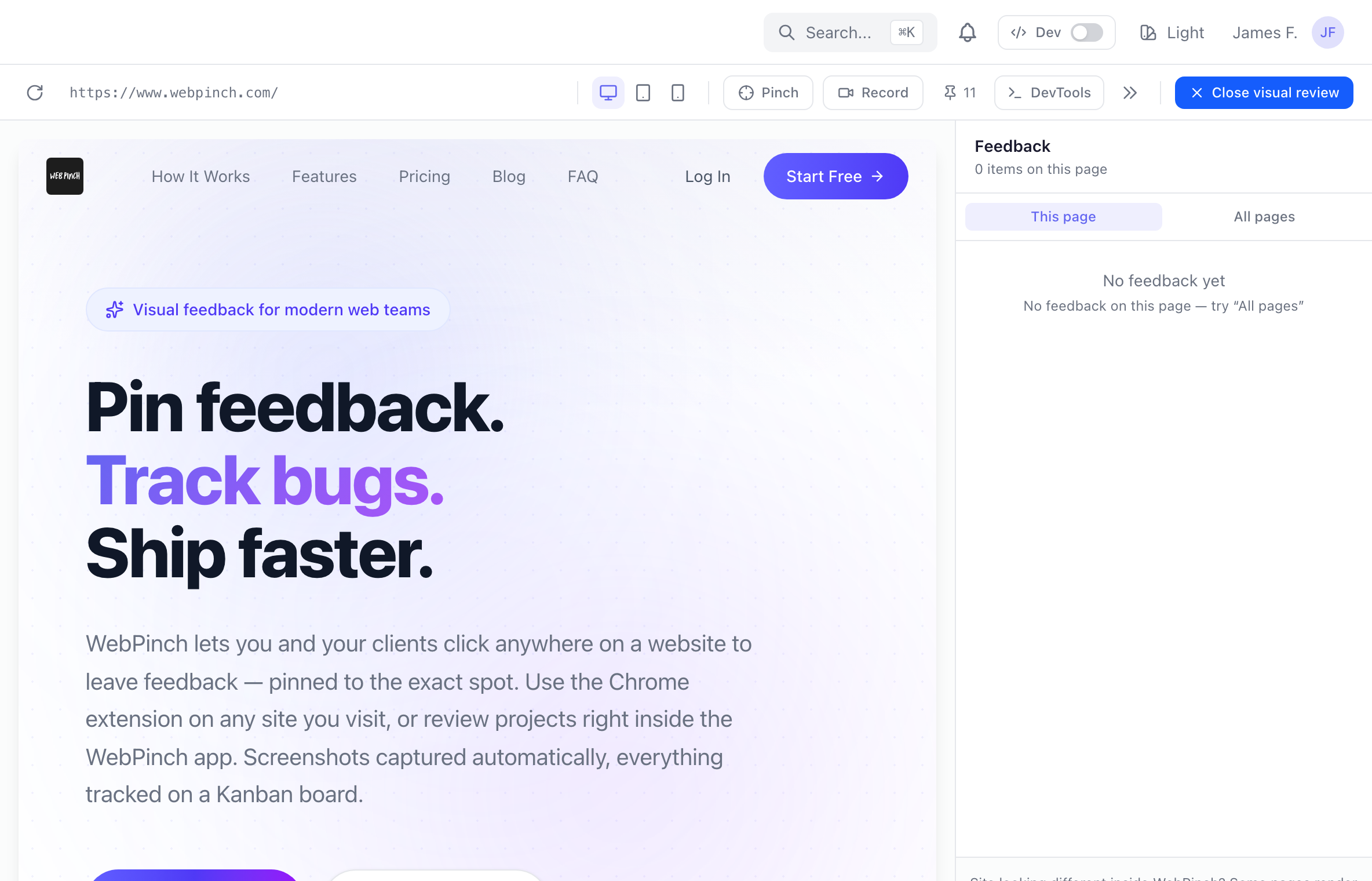
Visual review
Pin feedback directly on any live, staging, or localhost page.
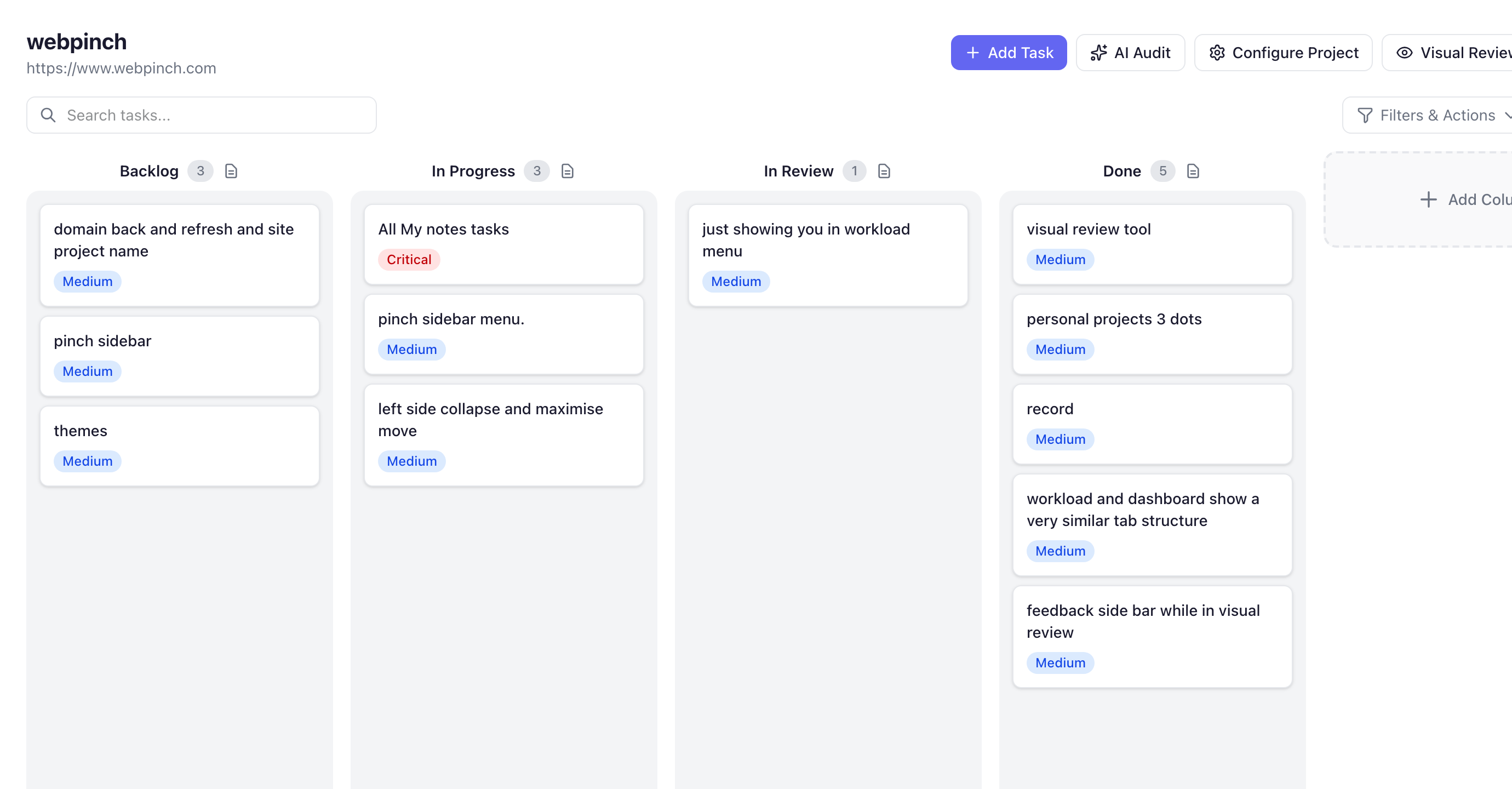
Kanban board
Every pin becomes a tracked task on your board.
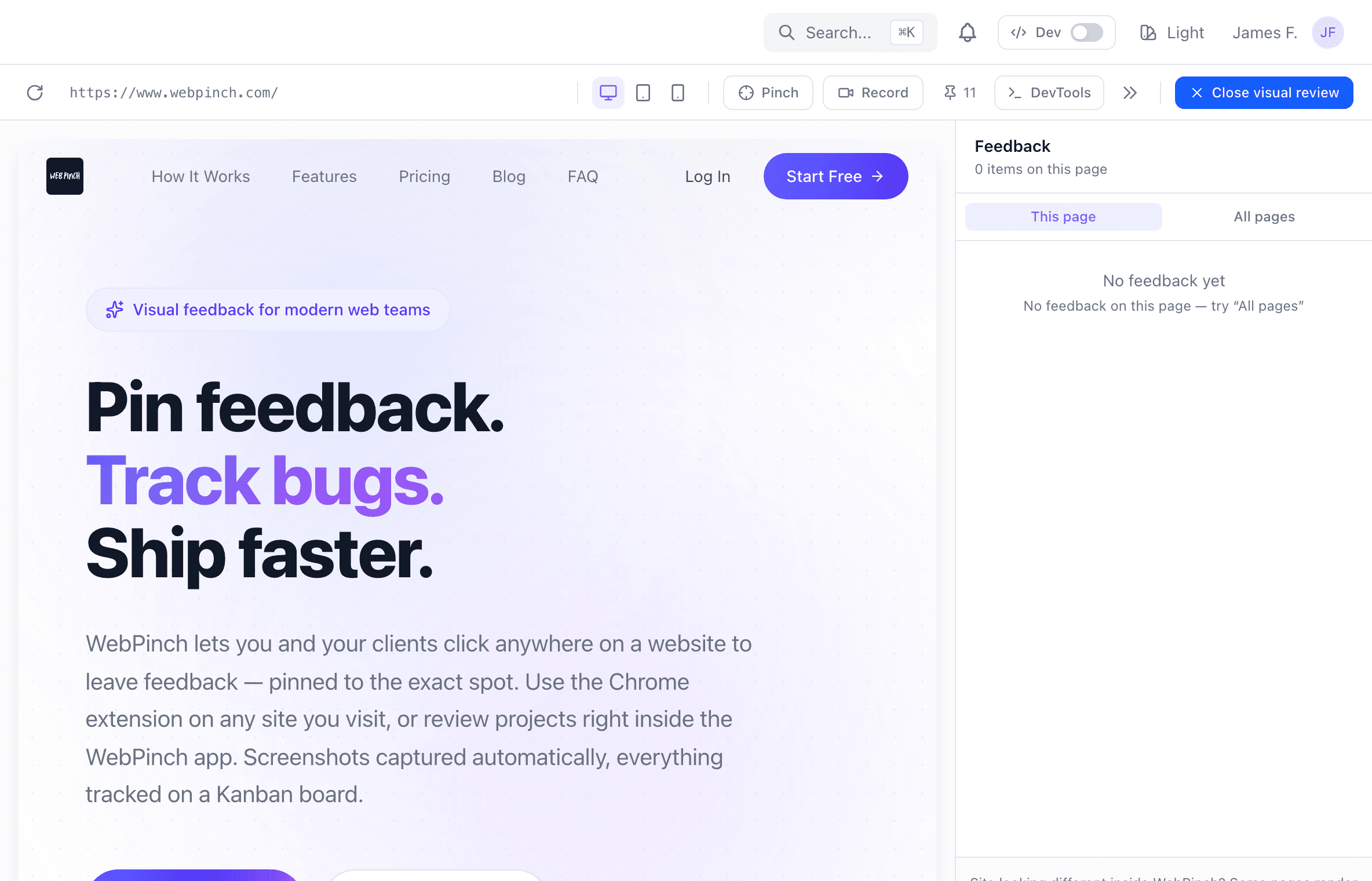
Pin feedback on any live site
Open visual review, drop a pin on the exact element, and leave a comment. Works on production, staging, and localhost — no setup on the site itself.
- Click-to-pin on the real page
- Desktop & mobile viewports
- Screen recording built in
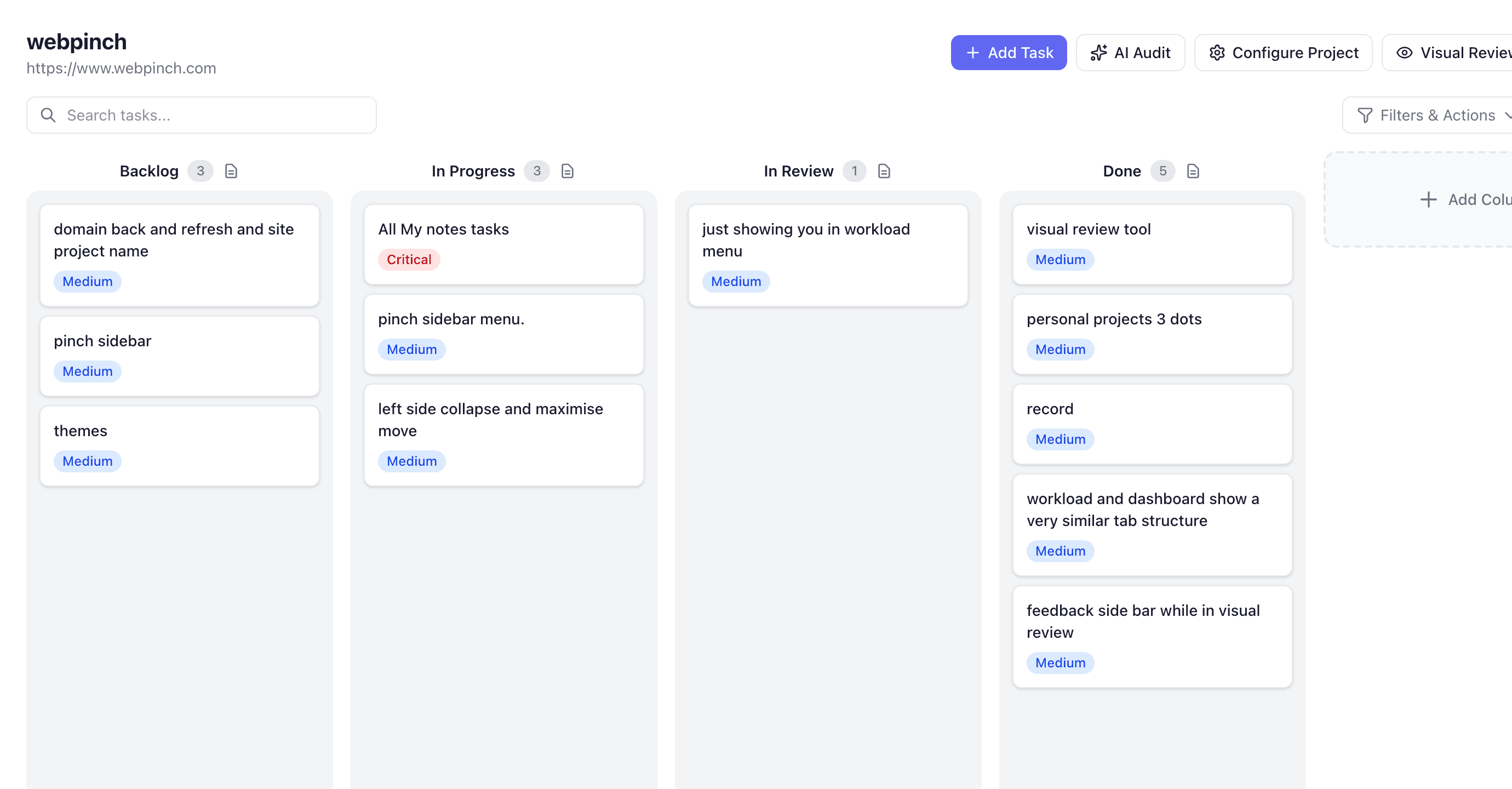
Every pin becomes a tracked task
Feedback lands on a Kanban board with the screenshot, browser & OS, and priority attached — so your team always knows what to fix next.
- Auto-captured context
- Statuses & priorities
- Shared across the team
Built for anyone who builds the web
Pick your role to see how WebPinch fits your day.
Agencies
Turn messy client feedback into a tidy board.
Share one link and let clients pin feedback directly on the site — no more interpreting paragraph-long descriptions of a misaligned button.
- One shareable link per project
- Feedback pinned to the exact element
- Clients need no account to comment
Teams feel it fast
faster feedback-to-fix cycles
Pinned, reproducible reports skip the back-and-forth.
of guests leave feedback with no account
Share a link — stakeholders comment in one click.
more issues caught before launch
Built-in audits and one-click pins surface more, sooner.
*Representative outcomes — replace with your measured figures before launch.
How we compare
Powerful enough for teams. Simple enough for clients.
Looking at a specific tool? See how WebPinch compares to BugHerd, Marker.io, Usersnap and more
From install to first pin in under a minute
No site changes, no client training, no credit card.
Add the extension
Install from the Chrome Web Store in a click — nothing to add to your site.
Pin your first feedback
Click any element on any live, staging, or localhost page and leave a comment.
Your team sees it on the board
Every pin lands on the Kanban board with a screenshot, browser & OS attached.
Loved by teams who ship
Straight from the feedback form below — real words from people using WebPinch.
“I really like the Kanban Board feature in WebPinch. It turns scattered website feedback into a clear workflow, making it easy to track progress and collaborate with the team. It has definitely helped us ship updates faster.”
“Really like the pin feedback feature. Instead of explaining where an issue is, I can just click on the page and leave a comment. It makes reviews much faster and keeps everyone on the same page.”
“WebPinch makes website feedback simple, clear, and efficient. The visual pinning feature helps teams collaborate better, reduces miscommunication, and speeds up project delivery. Highly recommended!”
“My QA and developer's team loves this software, it becomes so easy to pinch the bugs, make videos of screen and get in a kanban board, the MCP is top notch which does not exist in any other old softwares, getting the bugs directly to claude code and cursor fast up our process of bug fixing by nearly 60%.”
“The pin feedback feature is my favorite part of WebPinch. Being able to click directly on a website and leave comments exactly where changes are needed saves a lot of time. It makes communication much clearer and helps avoid long email chains. Simple, effective, and very easy to use”
“WebPinch has made our website review process much easier. Instead of sending screenshots and long email threads, our team can leave feedback directly on the webpage. It saves time and keeps everything organize.”
In the news
What the press is saying
Coverage of WebPinch, the product and the team behind it.
WebPinch Takes On the Visual Feedback Market with Built-In Site Audits, AI and Developer APIs
Agencies told us they were paying for a feedback tool, a separate SEO audit tool, and a project board, and still copying things between all three.Read on DailyhuntNation News Brief“Clients Aren’t Bad at Feedback. The Tools Are,” Says WebPinch Founder Siddharth Bisht
A marketing manager shouldn’t need to know what a viewport is or which version of Chrome they’re on. The software should capture that.Read on Nation News BriefPrime Post DailyWebPinch Expands Its Reach to Agencies Across the US, Europe and Australia with One Simple Global Price
An agency in Austin might have a designer in Lisbon and a client in Brisbane, all reviewing the same staging site.Read on Prime Post DailyOrange City TimesFrom the Foothills of the Himalayas to a Global SaaS: How Siddharth Bisht Built WebPinch for Web Teams Worldwide
People ask whether you can build a global software company from a small town in India. The honest answer is that the internet doesn’t care where you are.Read on Orange City TimesSimple pricing. No surprises.
Start free. Upgrade when your team grows.
Billed in USD via Stripe — renews automatically, cancel anytime.
Free
Perfect for trying out WebPinch
- 2 Personal Projects
- 1 Organization with 1 project
- 1 free teammate in your org
- 1 API / MCP token
Per Seat
For individuals, teams, and organizations
Billed $144/seat/year
- Everything in Free, plus
- Unlimited Projects
- Unlimited Organizations
- Unlimited API / MCP tokens
- Per-seat pricing
No credit card required to start. Cancel anytime.
Want to see what WebPinch could do for your team?
Book a 60-minute session and we'll walk through your review process together — where feedback gets lost today, and what it looks like once every comment lands on the board with the context already attached.
Schedule a meetingOpens in a new tab · pick any slot that suits you
Built around your workflow
We'll look at how your team collects and ships feedback today, and where WebPinch fits in.
60 minutes, no pitch deck
A working session, not a sales call — bring a real site and we'll pin real feedback on it.
Got questions? We've got answers.
How does WebPinch work?
You have two ways in: install the Chrome extension and pin feedback while browsing any website, or open a project inside the WebPinch app and use the built-in visual review. Either way, clicking on the page drops a pin, WebPinch captures the screenshot and technical details, and a task card lands on your Kanban board.
Does my client need to create an account?
No. You can share a guest link with clients and they can leave feedback instantly — no sign-up required.
What websites does WebPinch work on?
WebPinch works on any website — live sites, staging environments, or even local development servers. If you can open it in Chrome, you can use WebPinch on it.
What technical information does WebPinch capture?
Every pin automatically includes a screenshot of the page, along with the browser type and version, operating system, screen resolution, and the page URL.
What is the Kanban board?
The Kanban board is WebPinch’s built-in task management view. Every feedback pin becomes a card that your team can drag across columns (e.g., To Do, In Progress, Done), assign to teammates, and mark as resolved.
Do I need to add code to my website?
No. The Chrome extension works without any code changes, and the in-app visual review loads your site through a secure proxy — so you can collect feedback on any URL without touching the codebase.
Is WebPinch free to use?
Yes, WebPinch has a free plan to get started. Paid plans are available for teams needing more projects, members, and advanced features.
Tell us what you think
We build WebPinch from what people actually ask for. Two lines is plenty.
Ready to stop chasing
feedback?
Join hundreds of web teams who use WebPinch to collect clear, actionable feedback — without the chaos.
No credit card needed. Set up in 60 seconds.